
News
LinkedIn Is Trying To Help You Apply For Fewer Jobs
The platform’s new AI-powered “Job Match” aims to guide users toward roles they’re qualified for and away from those they aren’t.

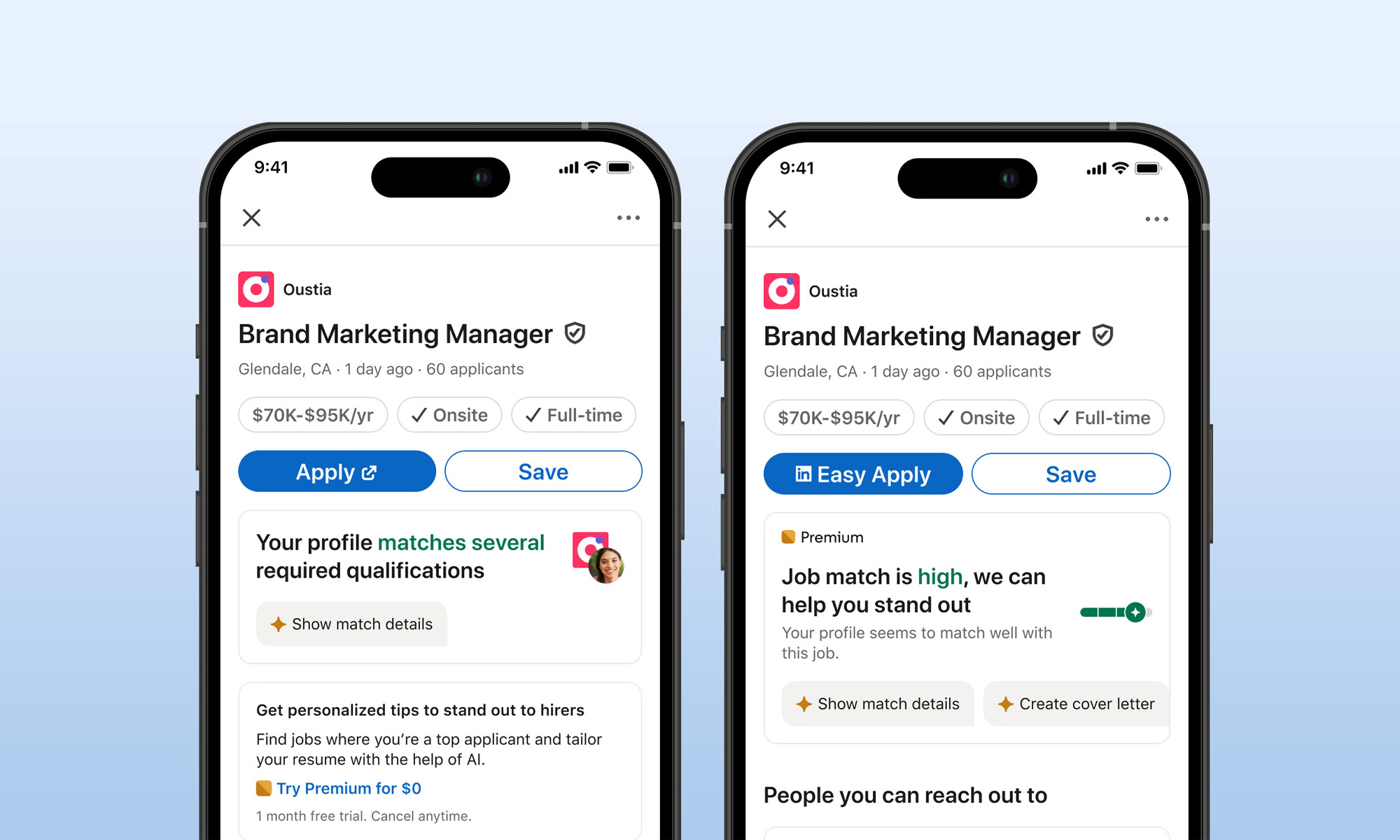
If you’ve ever spoken to anyone hunting for a job lately, you’ve probably heard about how difficult it is to even secure an interview. According to LinkedIn, one of the reasons for this struggle is that too many people are applying for roles they aren’t qualified for, making it harder for strong candidates to get noticed.
To tackle this, LinkedIn is rolling out a new AI-powered tool called “Job Match” — a feature designed to bridge the gap between job seekers and recruiters by offering detailed summaries that help users understand how well they fit a particular role.
Unlike simple keyword matching tools, “Job Match” takes a more nuanced approach by using AI to analyze a candidate’s overall experience and compare it with the qualifications listed in a job description. The idea isn’t just to help users find roles they’re qualified for, but also to steer them away from applying to jobs where they might fall short.
The feature is accessible to all LinkedIn users, but those with LinkedIn Premium get extra perks, such as more detailed insights about their job match level. In the future, recruiters will also benefit, as the tool aims to surface more qualified candidates, reducing the chances of strong applicants being overlooked.
Also Read: Foundster Is Dubai’s New AI-Driven Company Setup Service
Whether this new approach will make life easier for job seekers is still up for debate. The last couple of years have been brutal for many industries, with massive layoffs still a regular occurrence at the start of 2025. All this means even fiercer competition for fewer openings — something no AI tool can ever hope to completely solve.
However, LinkedIn product manager Rohan Rajiv believes the lack of transparency in hiring is a big part of the issue, pointing out that early testing of “Job Match” showed that a “non-trivial chunk” of mismatches between candidates and jobs is easier to fix than people realize. “I think there’s a portion of this that will always be labor market dynamics, but I would argue that there’s a significant portion of this that is just pure lack of transparency,” he said.






News
New Disney+ Streaming App Has Officially Launched In The UAE
The app’s recommendations now factor in what’s popular in the UAE, and a dedicated Junior Mode gives kids their own corner of Disney+.


A new Disney+ app has officially launched in the UAE, and subscribers can now keep watching their favorite titles when they travel. Disney+ says access extends across supported markets in Europe, the United States and beyond.
The app is built around a dynamic homepage and simpler navigation, with recommendations drawn from each customer’s viewing habits and what’s popular in the UAE. Content from Hulu and ESPN is now easier to find alongside Disney+’s own library, the company says. Audio and subtitles come in up to 25 languages, and supported devices get high-quality video and sound.
For families, the app includes Junior Mode, a dedicated, simplified version of Disney+ for younger viewers, built around age-appropriate shows and movies. It sits alongside existing controls such as PIN-protected profiles, customizable content ratings and account notifications when a profile is changed.
The catalog still spans Disney, Pixar, Marvel, Star Wars, National Geographic, Hulu and FX. Returning series include Season 8 of “The Kardashians,” Season 23 of “Grey’s Anatomy” and Season 38 of “The Simpsons”. Also on the service are the second season of International Emmy and BAFTA Award-winning series “Rivals,” comedy “Only Murders in the Building,” Walt Disney Animation Studios’ “Zootropolis 2” and 20th Century Studios’ “Send Help”.
Also Read: Best Video Streaming Services In The Middle East
Marvel Television’s “VisionQuest” is on the way, and Disney’s live-action “Moana” is due later this autumn. Beyond Hollywood, the Turkish title “Halef” is coming to the platform alongside a lineup of Korean entertainment: Korean-Japanese romantic comedy “Merry Berry Love” is streaming now, and “The Remarried Empress” arrives November 4.
Existing subscribers will be prompted to download the new app and sign in with their current credentials, with on-screen steps covering account confirmation and profile setup. Subscriptions start at AED 49.99 per month and can be canceled at any time.
For UAE subscribers planning to travel, the update will likely be well received, but Disney has left one question open. It confirms Europe and the United States as supported markets but doesn’t yet say which others fall under and beyond.

New Disney+ Streaming App Has Officially Launched In The UAE

Dubai Says Its Deepfake Detector Needs Just 7 Seconds Of Video

OpenAI Has Announced A Visual Ad Format For ChatGPT

For etisalat, More Bandwidth Is A Matter Of Digital Sovereignty

NEOPAY Wants To Follow Merchants Across Channels And Borders

Trip.com Is Betting An AI Agent Will Book Your Next Vacation

Musk’s Boring Company Wants To Dig 150 KM Of Tunnel Under The UAE

OKX Bets Streaming Perks Can Take Crypto Mainstream Across MENA

Meta’s New $499 Plan Puts A Price On Reaching A Real Person

Apple’s First Folding iPhone Arrives Late To A Shrinking Market


-
 News3 weeks ago
Trip.com Is Betting An AI Agent Will Book Your Next Vacation
-
 News4 weeks ago
Musk’s Boring Company Wants To Dig 150 KM Of Tunnel Under The UAE
-
 News3 weeks ago
OKX Bets Streaming Perks Can Take Crypto Mainstream Across MENA
-
 News3 weeks ago
Meta’s New $499 Plan Puts A Price On Reaching A Real Person