
News
Microsoft Is Resurrecting Clippy With Its New 3D Emoji
All new emoji are rendered in beautiful 3D, and the majority of them are animated to make them even more fun to use.


Remember Clippy, the whimsical paperclip assistant included in older versions of Microsoft Office? Well, Clippy is back. Well, kind of.
Microsoft understands that most people were happy to see the interactive animated character disappear from their office suite of choice. Still, the company’s designers just couldn’t resist included it in the refreshed set of 1,800+ emoji that will soon make its way into Windows, Office, and other Microsoft 365 products, including Teams.

All new emoji are rendered in beautiful 3D, and the majority of them are animated to make them even more fun to use when instant messaging with friends, discussing work with colleagues, or planning the new next family get-together.
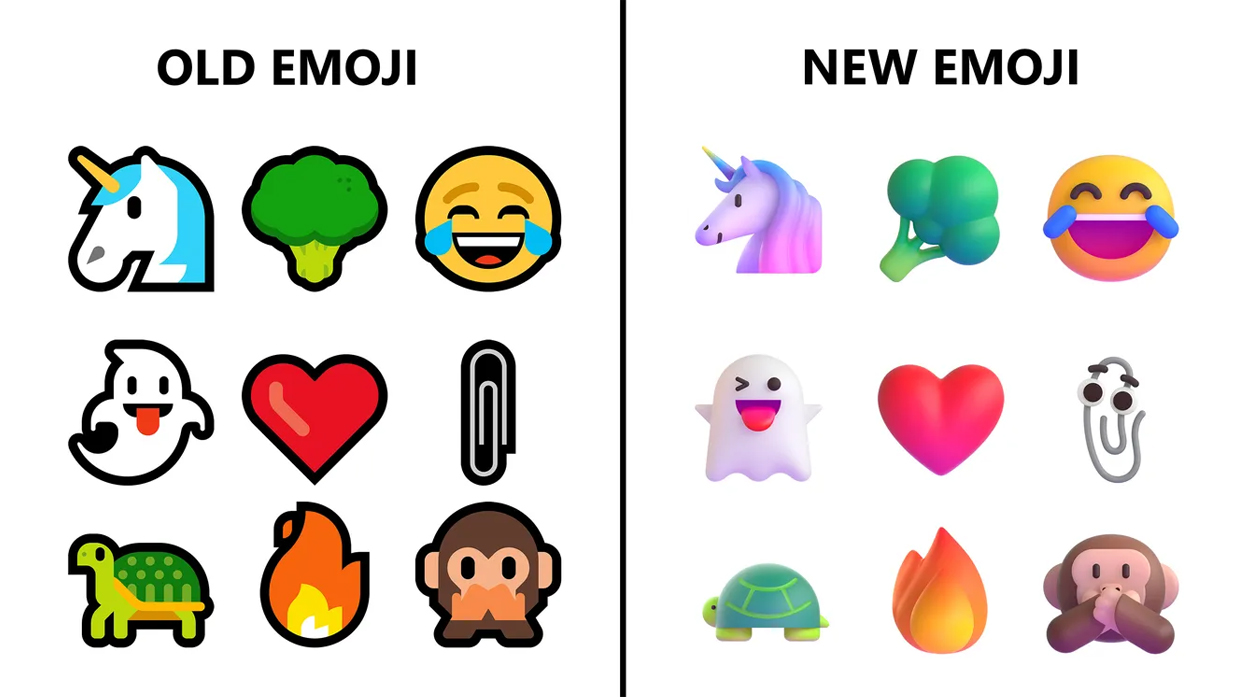
“Body language, subtle forms of humor, or environmental conditions — while we can see and respond to those cues those in-person, the loss of them in digital contexts impacts our communication greatly. With emoji, however, a few pixels can telegraph our thoughts and feelings in ways that are fun, clear, and emotionally resonant,” Claire Anderson, Art Director & Emojiologist at Microsoft, commented the role emoji have come to play in our modern lives.
The design principles that guided the look and feel of Microsoft’s new emoji revolve around emotional honesty and playfulness. The goal is to empower all users of Microsoft products to express themselves as openly and naturally as possible, even when separated by borders or even entire continents.
Also Read: Windows 11 Is Coming: Here’s What To Expect
Microsoft’s design principles are based on a substantial body of research suggesting that play encourages innovation. It will be interesting to see how the users of Microsoft products from around the world will put the new emoji set to use. Perhaps, it will really help them unlock their creative potential and nurture stronger relationships with the people they communicate with on a regular basis.




News
Abu Dhabi’s Robot Kitchen Is Serving Up Biryani, Not Burgers
Circus SE wants to put a tiny automated factory inside the buildings where Gulf residents live and work, bypassing part of last-mile delivery.

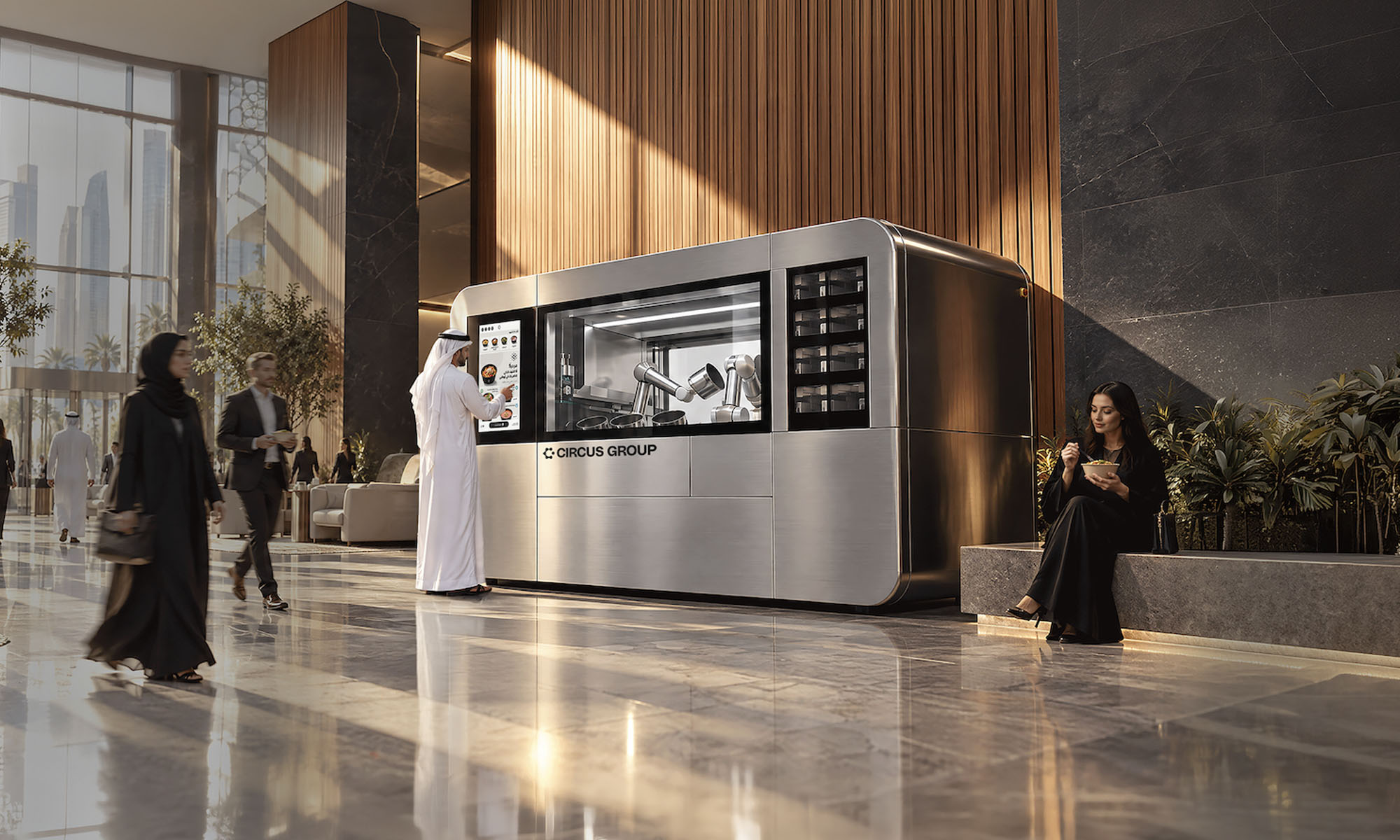
The most telling thing about a new autonomous kitchen now running in Abu Dhabi’s Marina Square is what it won’t cook:
“We don’t do fast food,” says Nikolas Bullwinkel, Founder and CEO of Circus SE. “We’ve actively decided not to build a machine that can only do burgers”.
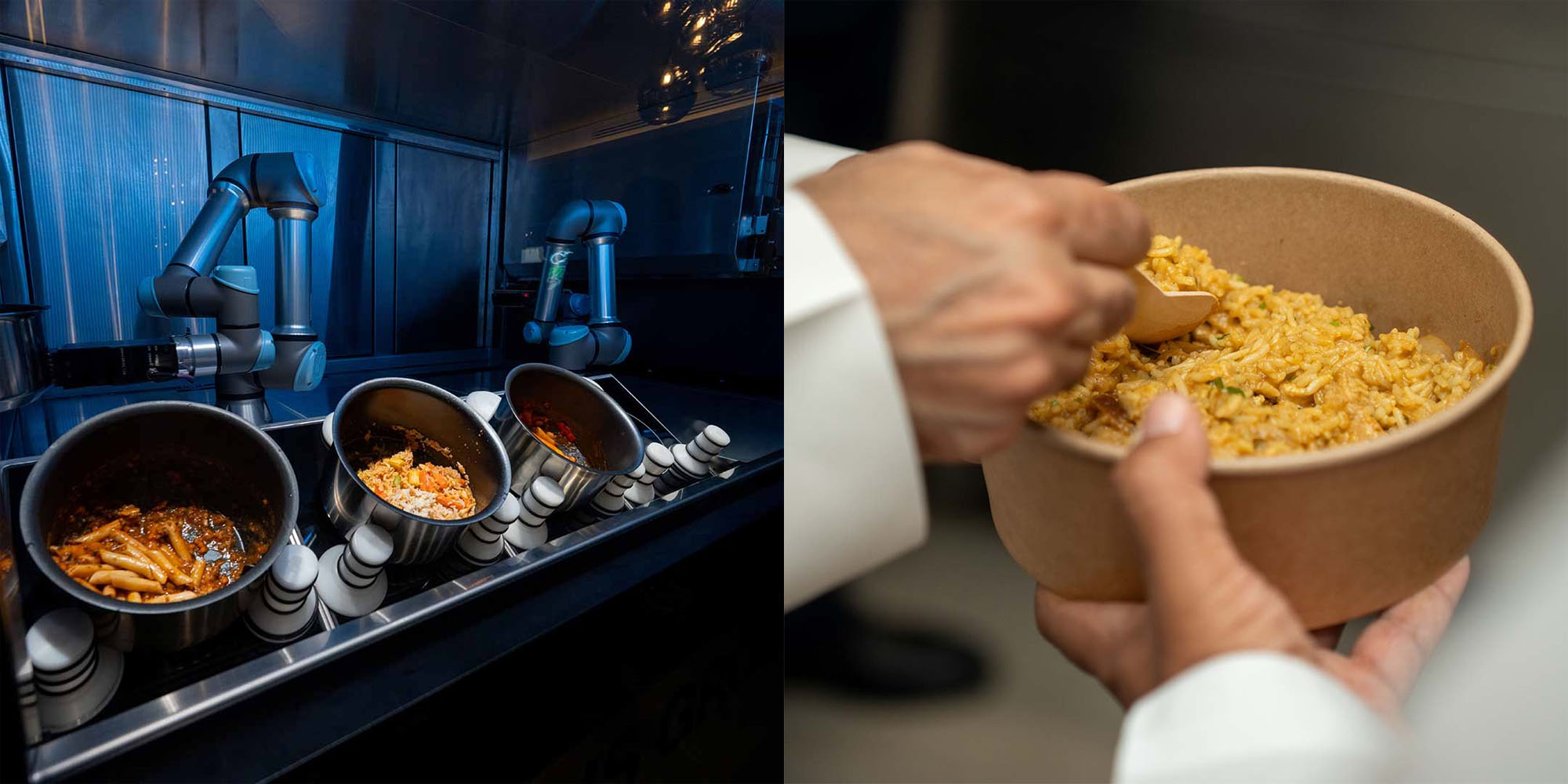
Instead, the CA-1 system is built around pot-based cooking: curries, pastas, soups and rice dishes. After experimenting with highly personalized recipes, Circus deliberately leaned back toward recognizable food. “We’re going with a chicken biryani because you know it,” Bullwinkel says of the AED 40 dish.
The Germany-based robotics and food technology company operates across eight countries, and Abu Dhabi is its first deployment outside Europe. More locations are expected there and in Dubai.
In Germany, its units can be placed in supermarkets, gas stations, airports and hospitals. In the Gulf, Bullwinkel wants them inside residential and office buildings, replacing some of the complexity of last-mile delivery. “We’re basically bringing a very tiny factory a few square meters into your building,” he says. Catering company Royal Prestige supplies the ingredients and knowledge of local tastes.
The CA-1 manages up to 36 refrigerated ingredient silos alongside automated induction cooking, robotic plating and a self-cleaning dishwasher. Two robotic arms move ingredients through the system with minimal human intervention. It can produce up to 120 hot meals an hour, and a meal such as rice and curry can take around three to four minutes.
Also Read: Ooredoo Qatar’s 5G+ Network Is Built For Machines As Much As People
Five cameras and multiple sensors monitor heat, temperature and consistency, an attempt to approximate what a chef perceives. “You can hear something gets burned, you can smell it, you can see it at some point,” Bullwinkel says. CircusOS, the company’s operating system, adjusts recipes in real time.
You might think of the platform as a threat to kitchen staff, but Bullwinkel frames Circus as a way for chefs to develop recipes and distribute them at scale. With that being said, rising labor costs and shortages are also part of his case for automation.

Abu Dhabi’s Robot Kitchen Is Serving Up Biryani, Not Burgers

Sennheiser’s MOMENTUM 5 Series Bets On Batteries You Can Swap

UAE’s 3-Minute University Registration Runs On Government Data

How Online Ads Became A Delivery System For Zero-Click Spyware

Shokz OpenDots 2 Review: Clip-On Audio Gets A Bass-Heavy Makeover

Dubai Says Its Deepfake Detector Needs Just 7 Seconds Of Video

New Disney+ Streaming App Has Officially Launched In The UAE

NEOPAY Wants To Follow Merchants Across Channels And Borders

RØDE’s Low-Profile Studio Arm Is Designed To Stay Out Of Shot

G42’s Inception42 Wants AI To Show Its Work Before Investors Commit


-
 News3 weeks ago
Dubai Says Its Deepfake Detector Needs Just 7 Seconds Of Video
-
 News3 weeks ago
New Disney+ Streaming App Has Officially Launched In The UAE
-
 News3 weeks ago
NEOPAY Wants To Follow Merchants Across Channels And Borders
-
 News4 weeks ago
RØDE’s Low-Profile Studio Arm Is Designed To Stay Out Of Shot