
News
Yango App Now Alerts Muslim Drivers To Prayer Times
The latest update caters to the unique needs of Muslim drivers across several MENA countries, including the UAE and Morocco.


Ride-hailing platform Yango has added a new feature to its app aimed at helping drivers stick to their prayer schedules throughout the Muslim calendar. In addition, the update will also facilitate the distribution of Iftar boxes during the important Ramadan fast. The latest feature is available to all Yango drivers in the UAE, Morocco, and several other locations.
Launched during the current holy month of Ramadan, the new app features allow drivers to seamlessly integrate their work schedules with religious duties, using high-tech mapping and smart routing to identify the nearest mosques and plot routes even in unfamiliar locations.
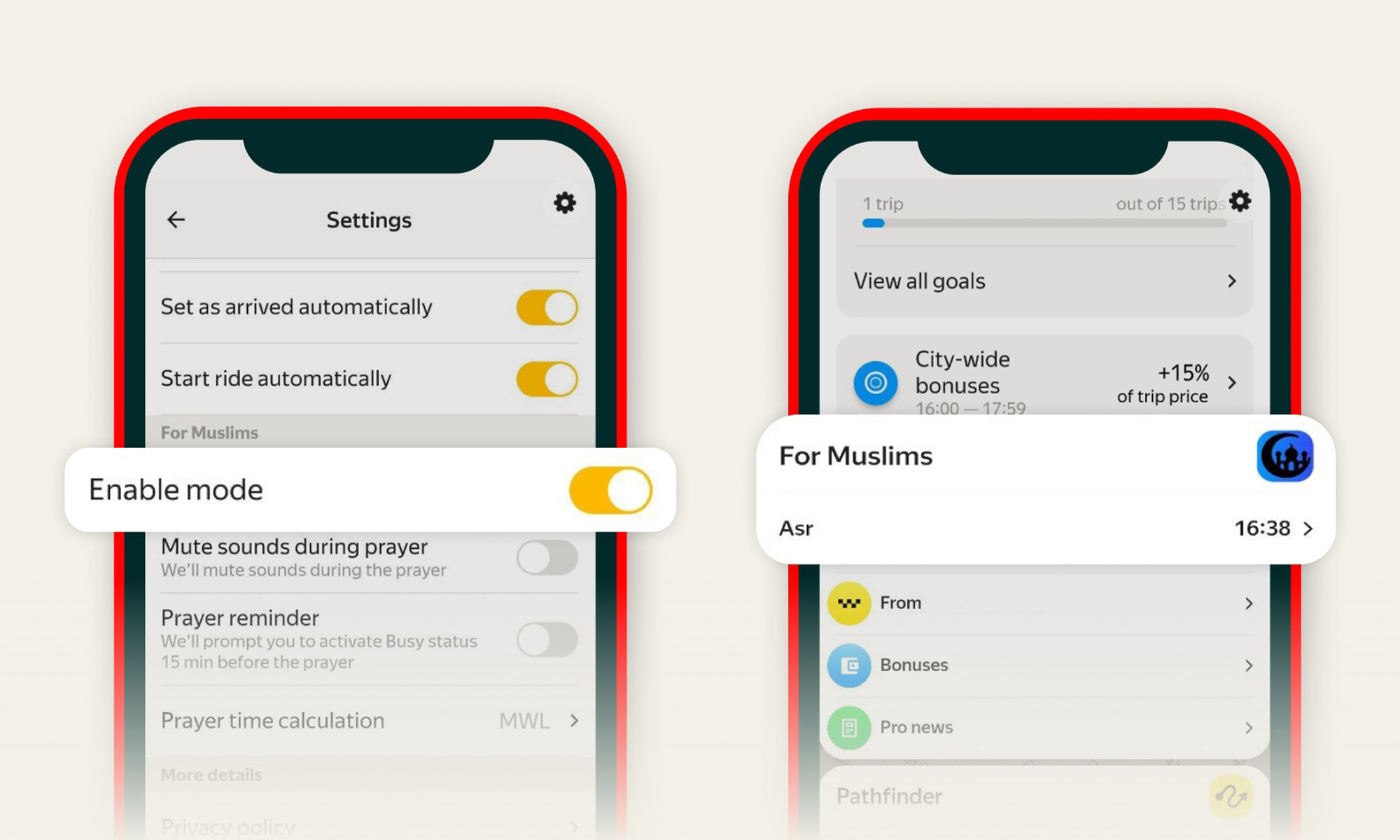
Within the Yango app settings, drivers will receive 15-minute reminders before prayer times, with notifications automatically muted when prayers commence. The app also points drivers in the direction of the Qibla and allows prayer times to be calculated according to the user’s preferred Islamic convention.
Islam Abdul Karim, General Manager of Yango in the Gulf Coast Countries, explained: “The introduction of the new mode for drivers, permanent beyond the Ramadan period, is a step forward in our ongoing effort to create a more inclusive and supportive environment for partners’ drivers. It enriches their work-life balance, blending advanced technology with local customs and practices. We are keen to not only enhance their daily experience but also set standards for cultural consideration within the tech industry”.
Also Read: Halo Space Capsule Set To Fly 32 Km Above Saudi Arabia
As a token of appreciation for the hard work and dedication of its drivers during Ramadan, Yango has also set up a dedicated zone to distribute special Iftar boxes, ensuring drivers on the road can break their fast.
Yango’s updated driver app joins a full suite of services from the company, including Yango Maps, Yango Play, Yango Tech, Arabic AI voice assistant Yasmina, and many more.




News
Ooredoo Qatar’s 5G+ Network Is Built For Machines As Much As People
Built on 5G Standalone and 5G Advanced, the upgrade lays the groundwork for Qatar’s 2030 digital ambitions.


Ooredoo Qatar has launched what it calls the country’s first 5G+ mobile network. Customers get faster connections, but much of what the operator is promising is aimed at machines.
5G+ isn’t a new generation of mobile technology so much as a layering of upgrades, building on 5G Standalone and 5G Advanced. The result is the familiar trio of higher speeds, greater capacity and lower latency.
For consumers, Ooredoo promises smoother streaming, more responsive gaming and steadier connections on the move. The service is commercially available through mobile broadband in 5G+ coverage areas, and the operator is aiming it at campers during the camping season. The network has been deployed at locations across Qatar, but the announcement doesn’t name them, say whether smartphone plans are included or put figures on the speed and latency gains.
The business case is more detailed: Greater capacity lets more devices connect and exchange data efficiently, while shorter response times support real-time equipment monitoring and automated processes. Network slicing tailors connectivity to specific uses, and 5G Advanced combined with edge computing targets mission-critical applications that require rapid responses. Expanded IoT capabilities cover industrial sensors, asset trackers and utility meters, the building blocks for automation and future smart city services. The company also cites AI-enabled services and complex digital workloads.
Also Read: WHOOP Goes Arabic, Betting On The Gulf’s Appetite For Health Data
“With the 5G+ network, we are enhancing everyday digital experiences for our consumers, enabling innovation, and strengthening the competitiveness of businesses across the country,” said Sheikh Ali bin Jabor bin Mohammad Al Thani, chief executive officer of Ooredoo Qatar.
“From launching the world’s first 5G network in 2018 to deploying Qatar’s first 5G Standalone core network, we have consistently advanced connectivity,” he added.
Ooredoo ties the rollout to Qatar National Vision 2030 and the Digital Agenda 2030, framing it as part of the country’s effort to strengthen its position as a leading regional digital hub. For that ambition, the devices that matter most may be the ones without screens.

Shokz OpenDots 2 Review: Clip-On Audio Gets A Bass-Heavy Makeover

Ooredoo Qatar’s 5G+ Network Is Built For Machines As Much As People

G42’s Inception42 Wants AI To Show Its Work Before Investors Commit

WHOOP Goes Arabic, Betting On The Gulf’s Appetite For Health Data

New Disney+ Streaming App Has Officially Launched In The UAE

In Kuwait, Your Surgeon Might Be Operating From Another Country

Microsoft Plans $10 Billion-Plus Gulf Expansion Despite Iran Conflict

Qatar Folds 45 State Companies Into A Single Investment Platform

NEOPAY Wants To Follow Merchants Across Channels And Borders

RØDE’s Low-Profile Studio Arm Is Designed To Stay Out Of Shot


-
 News3 weeks ago
In Kuwait, Your Surgeon Might Be Operating From Another Country
-
 News3 weeks ago
Microsoft Plans $10 Billion-Plus Gulf Expansion Despite Iran Conflict
-
 News4 weeks ago
Qatar Folds 45 State Companies Into A Single Investment Platform
-
 News2 weeks ago
NEOPAY Wants To Follow Merchants Across Channels And Borders